
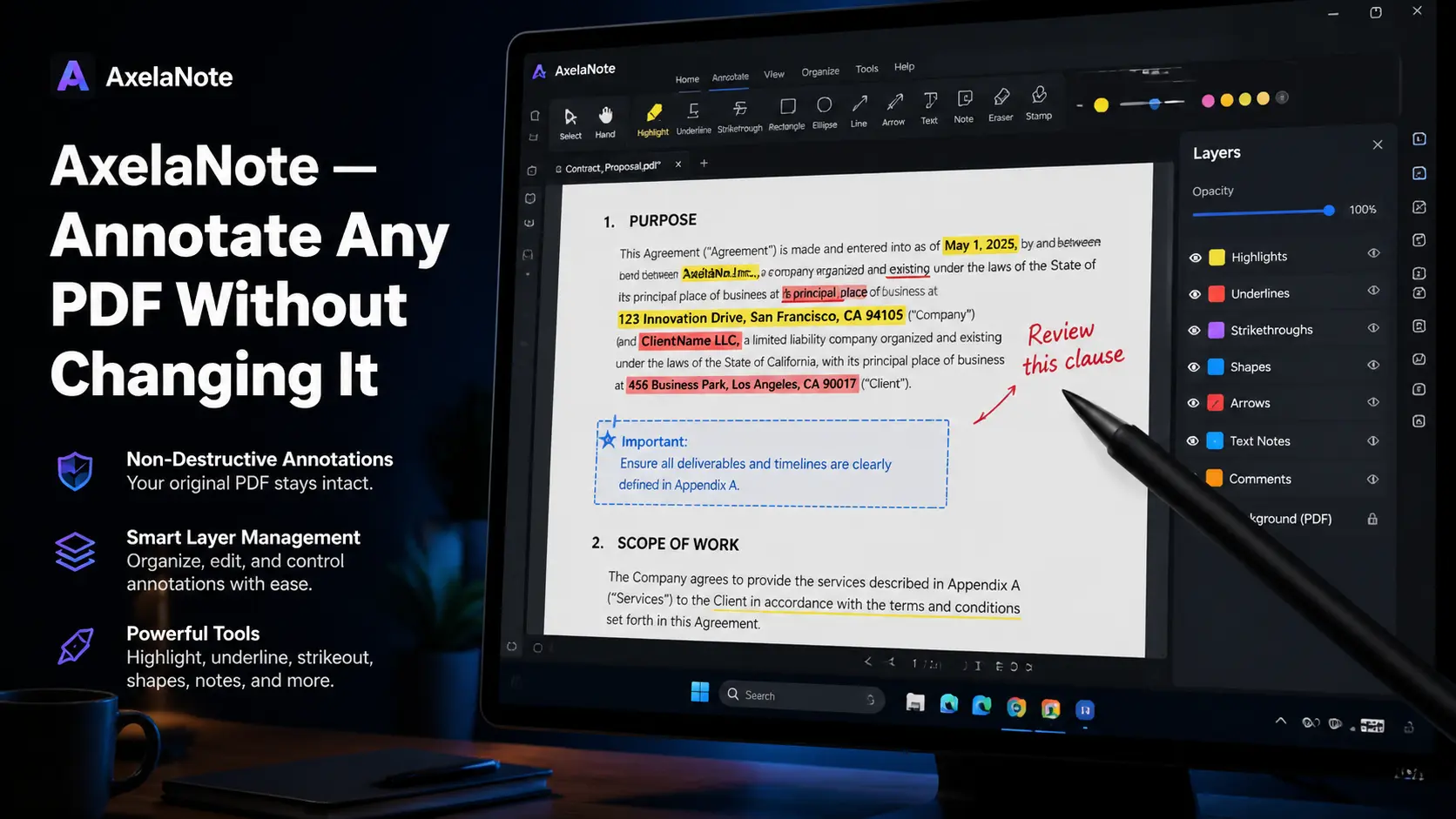
You’ve probably been there — a locked PDF lands in your inbox and you can’t add a single comment. You print it, scribble notes by hand, scan it back in, and somehow still lose track of your thoughts by the following week. The broken workflow which AltelaNote was created to resolve exists as the main problem which the software solves. The professional document annotation and knowledge management tool AxelaNote enables users to work with PDF content through their entire academic or professional research activities. The software AxelaNote enables users to create live annotations on documents which remain unchanged because their original content stays hidden behind a protective layer.
What Exactly Is AxelaNote and How Does It Work
AxelaNote is a Windows-based annotation platform which creates a non-destructive overlay layer that users can place over any PDF document. The process resembles applying an acetate sheet to a printed document because users can write on the acetate while maintaining the original paper’s condition.
AxelaNote creates an automatic annotation layer when users open a PDF document within the software. All your additions including highlights and typed notes and freehand sketches and color-coded stamps will exist on that layer which separates from the actual PDF document.
Your annotations are saved as a distinct linked file which enables you to preserve the original document in its complete state. The document review process transforms completely for professionals who need to work with secure or sensitive PDF documents because of this particular functionality.
The Problem AxelaNote Actually Solves for Modern Professionals
The majority of professionals have created an unapproved method to access locked PDF files which they all find embarrassing. Your process starts with you taking screenshots of important sections which you then paste into Word and create notes for each picture before saving the document under a different title.
The pattern appears at law firms and engineering teams and academic institutions in a manner that occurs too often. The actual expense goes beyond time loss because people need to deal with the mental burden that comes from handling their disorganized notes which exist in four separate systems.
When your meeting notes exist in one application while your research PDFs exist in another location and your handwritten notes exist in a physical notebook your brain power gets wasted on searching for data. AxelaNote merges all separate elements into one complete and structured working process.
The Layer System That Sets AxelaNote Apart from Other Tools
The multi-layer architectural design of AxelaNote establishes its complete separation from standard annotation tools. The document allows you to create multiple independent layers which you can color-code according to your needs.
A project manager reviewing a deliverable might use one layer for personal observations, a second for engineering team input, and a third specifically for client-facing comments. Users can control the visibility of each individual layer through independent toggle switches.
The process to hide internal layers from client access requires only a few seconds to complete. You should activate all features to complete your team debriefing. The system needs three different documents to track user activity and handle feedback through email which creates problems with version control. AxelaNote handles it with a single toggle.
How AxelaNote Compares to Adobe Acrobat, Notion, and OneNote
Adobe Acrobat Pro provides users with extensive functionality, but its price of $239.88 per year in the United States allows users to access all document permission features, which includes rendering locked PDF documents inaccessible for all user annotations.
AxelaNote sidesteps this completely because it never modifies the original file. Notion and Obsidian enable users to create text-based knowledge systems, yet both applications lack any effective methods to annotate PDF documents.
OneNote provides effective note-taking functions within the Microsoft ecosystem, yet it does not support users who need to add content to PDF documents through non-destructive overlay methods. AxelaNote does not compete with other products through its extensive range of features. The company provides its solution through a precise tool which disables all PDF document protection to solve the most common annotation challenges.
Who Gets the Most Value from Using AxelaNote in 2026
The AxelaNote application creates a specific perfect usage area which requires users to determine their eligibility for this area before making their purchase decision. The most immediate benefits from this system go to professionals whose jobs involve working with locked or restricted PDF documents.
AxelaNote provides engineers and lawyers and medical professionals with a unique solution that no other budget-friendly tool can deliver because these professionals need to annotate documents that they are not allowed to change.
The second main user group consists of academic users who include researchers working on multiple research papers and students who need to annotate lecture slides protected by their professors. The CSV export feature enables researchers to extract complete annotation data into a spreadsheet format which helps them study findings from multiple source documents at once.
Real-World Results and Performance Data Worth Knowing
The 2026 government pilot program in Japan which tested AxelaNote through its annotation overlay tools demonstrates the software’s actual operational capabilities. The initiative targeted a 30% reduction in document checking time, and early results supported that figure while keeping every original file completely intact.
The improvement derives from more than just annotation features. The document reference system allows document reviewers to access their embedded notes directly at the document points which they understand.
The freelance strategy consultant who used AxelaNote for his work found that he needed 50% less time to prepare for client calls because he could find all needed documents and notes in a single folder.
Common Mistakes New AxelaNote Users Make and How to Avoid Them
The first-time users who fail to achieve their desired outcomes demonstrate several consistent patterns of behavior. The most common mistake is treating AxelaNote like a general-purpose note-taking app. The application serves as a document-focused solution which users should not attempt to use as a replacement for Notion or Evernote.
The best way to use the application is to select its most effective function while using a separate application for your free-form thinking needs. The second mistake is not using the layer system from day one. Users who dump everything onto a single default layer lose the organizational advantage immediately.
Users must establish their color-coded named layers before they begin their first document annotation process. The third mistake involves moving the original PDF file without transferring its corresponding annotation file because both files need to remain together for the link to function.
AxelaNote Pricing — Is It Worth Paying For in 2026
The User License cost of $25.50 per year allows users to calculate the total value of AxelaNote. The tool generates savings of thirty minutes each month which would have been used for printing and handwriting notes and scanning documents and searching for missing annotations in various applications.
The Device License which costs $35.37 per year provides access to shared spaces such as training rooms and computer labs and a five-machine training room needs only $177 in annual costs because it requires fewer resources than current document review needs.
The 30-day free trial for both license types allows users to test AxelaNote in their actual work processes before making any financial commitment for one month. The trial period eliminates all substantial risks which would prevent users from testing the product.
Conclusion: Why AxelaNote Deserves a Serious Look Right Now
AxelaNote fills a specific gap that has existed in professional document workflows for years, and it does so without overcomplicating the solution. Most PDF tools either modify your original file or block you entirely when permissions are restricted.
The overlay system of AxelaNote lets users make annotations on documents while the original file remains intact. The multi-layer architecture of the system along with stylus support and CSV export for researchers and AI-assisted organization through Felix create a focused tool which solves an existing problem.
AxelaNote requires thirty days of your complete dedication because it benefits professionals who use PDFs in engineering legal services education project management and other fields. Begin your free trial by creating your initial layers which will demonstrate project outcomes on your first day.